A technical SEO audit checklist is a structured way to find the issues stopping search engines from crawling, indexing, and ranking your site correctly - things a content edit can’t fix, because the problem sits underneath the content. If you’ve never run one, or you inherited a site and don’t know what’s wrong with it, this is the order I actually work through, drawn from audits on sites ranging from a handful of pages to some of the largest content portals in Southeast Asia.
What is a technical SEO audit? It’s a systematic review of the technical layer of a website - crawlability, indexation, site architecture, page speed, structured data, and on-page fundamentals - done to find what’s silently suppressing organic visibility before you invest in more content or links. It’s diagnostic, not creative: you’re not writing anything, you’re finding what’s broken.
I cataloged 655 individual technical issues across 254 pages on a Singapore immigration consultancy’s site during one audit - everything from duplicate title tags to orphaned pages to a crawl trap in a faceted filter. That same audit found 2.2 million monthly impressions, but roughly 80% of the traffic behind them had zero commercial intent - a finding that changed the client’s content strategy more than any single technical fix did. On another engagement, working inside a large medical content portal, the technical foundation built during scaling supported growth from 1.3 million to 5.4 million monthly visits. Technical audits don’t just stop bleeding - done early, they’re what lets growth compound instead of hitting a ceiling.
This checklist is organized in the order I actually run it: crawlability first (nothing else matters if Google can’t reach the page), then architecture, Core Web Vitals, structured data, and on-page. Use the downloadable template at the end to track findings against your own site.
How to perform a technical SEO audit: the process
Before the checklist itself, here’s the process that wraps around it - because a checklist run in the wrong order wastes time.
- Crawl the site with a proper crawler, not just a manual click-through. Screaming Frog, Sitebulb, or a custom crawler (I run my own Python crawlers for anything with non-standard rendering or scale beyond what off-the-shelf tools handle cleanly) - the tool matters less than crawling the entire site, including orphaned and low-traffic pages, not just the ones you already know about.
- Pull Search Console data for the same period. A crawl shows you the site as it exists today; GSC shows you how Google has actually been treating it - impressions, clicks, indexation status, and manual actions. You need both, because a page can crawl perfectly and still be functionally invisible in search.
- Segment findings by severity, not by category. A broken canonical on your highest-traffic page is a P0. A missing alt tag on an archived blog post is a P2. Resist the urge to fix things in the order you found them - fix by traffic and revenue impact first.
- Validate before you fix. Especially on larger sites, confirm an issue is actually happening in production (not just in a staging crawl) before spending engineering time on it.
- Document a before-state. Screenshot or export GSC data, rankings, and crawl stats before you touch anything. Without a baseline, you can’t prove the audit worked - and you’ll want that proof for the next round of prioritization.
This is the process I ran on the Singapore immigration consultancy audit: crawl first, GSC second, then triage. The 655 issues across 254 pages didn’t get fixed in the order they were found - they got fixed in the order that moved the 2.2 million monthly impressions toward pages with actual commercial intent, since roughly 80% of that traffic volume was informational, not buyer-stage. That distinction - technical health vs. traffic quality - is often the more valuable finding than the issue count itself.
One planning note before you start: if a site migration, replatform, or redesign is anywhere on your roadmap, run this audit before it - the SEO migration checklist leans directly on a clean pre-migration baseline crawl, and an audit like this one is exactly how you’d build it.
Crawlability & indexation
Start here because everything downstream is irrelevant if a page can’t be crawled or indexed in the first place.
- Robots.txt review. Check for accidental
Disallowrules blocking important sections. A single overly broad rule (Disallow: /blog) can silently deindex an entire content section. - XML sitemap audit. Confirm the sitemap only includes canonical, indexable, 200-status URLs. A sitemap full of redirects, 404s, or noindexed pages wastes crawl budget and signals poor housekeeping to Google.
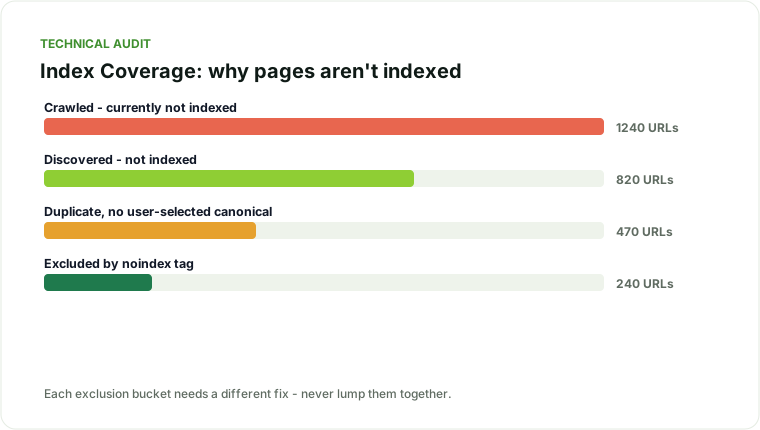
- Index coverage report (GSC). Go through every status bucket - “Excluded by noindex tag,” “Crawled - currently not indexed,” “Discovered - currently not indexed,” “Duplicate without user-selected canonical.” Each bucket needs a different fix; lumping them together wastes time.
- Noindex tag audit. Crawl the site and export every page with a noindex directive. Compare against pages you actually want indexed - this is one of the most common accidental leaks, especially after a CMS migration or staging-to-production push.
- Canonical tag audit. Every indexable page should have a self-referencing canonical unless it’s intentionally consolidating with another URL. Check for canonicals pointing to the wrong page, to a parameterized URL, or to a 404.
- Crawl budget and crawl traps. Faceted navigation, infinite calendar pages, session-ID parameters, and internal search results pages can generate near-infinite low-value URLs that eat crawl budget meant for real content. This matters more as a site scales - see the dedicated guide on crawl budget optimization if you’re running a large or fast-growing site.
- HTTP status code audit. Crawl the full site and flag any internal links pointing to 4xx or 5xx responses, and any redirect chains longer than one hop.
- HTTPS and mixed content. Confirm the entire site serves over HTTPS with no mixed-content warnings, and that HTTP versions of URLs 301 to HTTPS, not to a 200.
Site architecture & internal links
Crawlability gets Google to a page. Architecture tells Google - and users - which pages matter most.
- Click depth. Map how many clicks it takes to reach every important page from the homepage. Pages buried more than 3-4 clicks deep get crawled less often and inherit less authority.
- Orphaned pages. Cross-reference your XML sitemap against your internal link crawl. Any page that’s in the sitemap but has zero internal links pointing to it is orphaned - it relies entirely on external signals to be found and ranked.
- Internal link distribution. Identify your most-linked-to pages and check whether they’re the pages you actually want to rank. It’s common to find a privacy policy or an old blog post accumulating more internal link equity than a core commercial page.
- Pillar-cluster structure. Related content should link to a central pillar page, and the pillar should link back down. Where this is missing, pages tend to compete with each other for the same queries instead of reinforcing one target page - a pattern covered in depth in the keyword cannibalization guide.
- Breadcrumbs and URL structure. Confirm breadcrumb navigation matches logical site hierarchy, and that URLs reflect that hierarchy rather than flat, disconnected slugs.
- Pagination handling. Paginated series (blog listings, product category pages) should use clear internal linking and, where applicable, self-referencing canonicals per page - not a canonical that collapses everything to page 1.
- Anchor text audit. Pull every internal link’s anchor text site-wide. Generic anchors (“click here,” “read more”) waste an opportunity to reinforce topical relevance; over-optimized exact-match anchors repeated everywhere can look manipulative. Aim for descriptive, varied anchors.
- Navigation and footer link bloat. Global navigation and footer links get crawled on every page. A footer stuffed with 80 links dilutes the equity passed to each one - audit what’s actually earning its place there.
On the immigration-consultancy audit, click-depth mapping surfaced a specific pattern worth naming: several genuinely valuable service pages sat five and six clicks from the homepage, buried under a generic resources hub, while thin, auto-generated location pages sat two clicks deep because they’d been added to the main navigation by default. Fixing the navigation hierarchy - not writing a word of new content - was one of the higher-leverage changes in that engagement.
Core Web Vitals
Page experience signals are table stakes, not a differentiator on their own, but a failing score is still a ceiling on rankings and a genuine conversion killer.
- LCP (Largest Contentful Paint). Check the real-user data in GSC’s Core Web Vitals report and lab data in PageSpeed Insights. Common culprits: unoptimized hero images, render-blocking CSS/JS, slow server response time.
- INP (Interaction to Next Paint). Test interactive elements - menus, filters, forms. Heavy JavaScript execution on interaction is the usual cause of poor scores here.
- CLS (Cumulative Layout Shift). Check for images and ads without reserved dimensions, and web fonts that swap in and shift text.
-
Mobile vs. desktop split. Vitals are assessed separately by device - a site can pass on desktop and fail on mobile, and mobile is what Google indexes and ranks primarily.
-
Server response time (TTFB). Vitals fixes on the front end are wasted if the server itself takes 1.5+ seconds to respond before any rendering starts. Check hosting, caching layer, and database query performance for templated pages that hit the database on every request.
- Third-party script audit. Tag managers, chat widgets, and ad scripts are frequent, under-audited contributors to poor INP and LCP. Load them asynchronously or defer them where the business impact allows it.
This is a large enough topic that it gets its own dedicated walkthrough - see Core Web Vitals optimization for the practical, page-by-page fix list.
Structured data
- Schema validation. Run every template type (article, product, FAQ, local business, breadcrumb) through Google’s Rich Results Test and check for errors, not just warnings.
- Schema-to-content match. Confirm the structured data actually reflects what’s visibly on the page - mismatched schema (e.g., FAQ markup for content that isn’t visibly a Q&A) risks a manual action against rich-result eligibility, not just a missed opportunity.
- Duplicate or conflicting schema. Check for multiple schema blocks on one page describing the same entity differently - common after a CMS plugin stacks on top of manually added JSON-LD.
- Organization and author markup. For E-E-A-T-sensitive content (health, finance, legal), confirm author schema is present and links to a real author entity, not a generic byline.
On-page
- Title tags. Unique per page, primary keyword near the front, under ~60 characters to avoid truncation. Flag duplicates - a common finding on templated pages (product variants, location pages).
- Meta descriptions. Present, unique, compelling, under ~155 characters. Missing meta descriptions aren’t a ranking factor directly, but they hand Google the choice of snippet, which is rarely as good as one you write.
- Heading hierarchy. One H1 per page, containing the primary keyword naturally. H2s and H3s should follow a logical outline, not be used for styling.
- Image optimization. Descriptive file names, alt text that describes the image (not keyword-stuffed), and modern formats (WebP/AVIF) with appropriate compression.
- Content depth vs. search intent. Check whether the page actually answers what the ranking query implies. This is the single most common gap I find on templated or thin pages - they’re technically fine and still don’t rank because they don’t satisfy intent.
- Duplicate content. Run a site-wide content similarity check, especially on templated pages (city/location pages, product variants) that are often 90%+ identical apart from a swapped noun.
- Thin content flagging. Anything under roughly 300 words that’s trying to rank for a competitive term is worth a second look - not because word count itself is a ranking factor, but because it usually signals the page hasn’t fully answered the query.
- Outbound link quality. Check for broken external links and links to low-quality or irrelevant domains, both of which are minor trust signals that add up across a large site.
Downloadable technical SEO audit checklist
I’ve packaged this exact framework as a working technical SEO audit template - the same structure I use on client engagements - as a lightweight, no-login Google Sheet covering all five sections above with columns for status, priority (P0-P2), owner, and estimated effort. It’s built directly from real audits, including the 655-issue catalog referenced earlier, condensed into a format you can run against your own site in an afternoon rather than assembling a checklist from scratch.
The template is deliberately simple: one tab per section (crawlability, architecture, CWV, schema, on-page), one row per check, and a priority column that forces a decision at the point you log the issue rather than after you’ve found 400 of them and lost the will to triage.
↓ Download the Technical SEO Audit Checklist (PDF)
Free, no email required - the same five-section structure I run on client audits, condensed to one page you can work through against your own site.
Where to go after the audit
A checklist tells you what’s wrong. Prioritizing it - and deciding what to fix first when you have 655 issues and one afternoon - is a separate skill, and it’s usually where in-house teams get stuck: everything looks urgent, so nothing gets fixed. The fix is triaging by traffic impact and effort, not by how easy an issue is to explain in a meeting.
If you’re mid-audit and want a second pair of eyes on prioritization, or you’d rather have someone run the full crawl and interpretation for you, that’s exactly what my technical SEO audit engagements are built around - a prioritized fix list, not just a spreadsheet of problems.
Traffic sliding, or planning a risky migration?
I diagnose why organic traffic dropped and reverse it - core updates, migrations, cannibalization, technical decay.
Explore SEO recovery services