An SEO migration checklist exists because site migrations are one of the single most common causes of a sudden organic traffic collapse - and almost all of that damage is preventable with a plan, not a scramble after launch. A domain change, replatform, redesign, or URL restructure touches every signal Google has ever associated with your site. Get the redirect mapping wrong, or skip pre-launch QA, and you can lose months of rankings in a weekend.
I ran a full site migration for a Singapore moving company with a target of zero organic traffic loss - not “minimize the damage,” zero. The site held 5,000-8,000 visits a month throughout the entire migration, with no dip in the transition period. The method wasn’t a longer checklist than usual. It was a custom Python pre/post crawl-comparison analyzer that made “did we break anything” a data question with a yes/no answer, checked before launch instead of discovered after.
This is the checklist and the method, in the order I actually run it.
Building your SEO migration plan: match the strategy to the migration type
Not every migration carries the same risk, and your SEO migration strategy should scale with it. Four common types, roughly ordered by risk:
- Domain change (e.g., moving to a new TLD or rebrand). Highest risk - every backlink, every ranking signal, every piece of domain trust is tied to the old domain. Requires the most rigorous redirect mapping and the longest monitoring window.
- Platform/CMS migration (e.g., WordPress to a headless CMS, or a custom platform swap). URL structure often changes as a side effect of the new platform’s routing conventions - easy to underestimate how many URLs actually shift.
- URL structure change (e.g., flattening
/category/subcategory/product/to/product/) on the same domain and platform. Narrower blast radius, but still requires a full redirect map - this is the type most often “handled” with lazy wildcard rules, which is exactly where it goes wrong. - Redesign without URL changes. Lowest risk from a redirect standpoint, but still needs the crawl-comparison method applied to content, internal linking, and technical implementation (templates, schema, page speed) since those all change even when URLs don’t.
Your plan should name which type (or combination) you’re running, because it determines where risk concentrates. A domain change needs backlink-by-backlink redirect verification; a redesign-only project needs content-parity verification instead. Treating every migration with the same generic checklist misses the type-specific risk.
Pre-migration baseline crawl
Before anything else moves, you need a complete, dated record of the site exactly as it exists - this baseline is what every post-launch comparison gets measured against.
- Full crawl of the live site. Every URL, status code, title, meta description, canonical tag, H1, internal link, and redirect chain. Not a sample - the full site, including low-traffic and orphaned pages, because “low traffic” pages can still hold link equity or rank for long-tail terms you’d only notice missing after the fact.
- Export Search Console data for the prior 3-6 months. Impressions, clicks, and average position by page and query. This is your traffic baseline, separate from the crawl baseline - you need both because a page can be technically fine and still lose all its rankings if the query-to-page mapping breaks.
- Export current backlink profile (Ahrefs, Search Console links report, or equivalent) by target URL. Every backlink pointing to a URL that’s about to change needs a redirect target, or that link’s equity is lost.
- Document current XML sitemap(s), robots.txt, and any existing redirect rules. These often get silently regenerated or reset during a platform migration if nobody explicitly carries them forward.
- Screenshot or archive key rankings for your priority commercial terms. This becomes your fastest sanity check post-launch, before Search Console data has caught up.
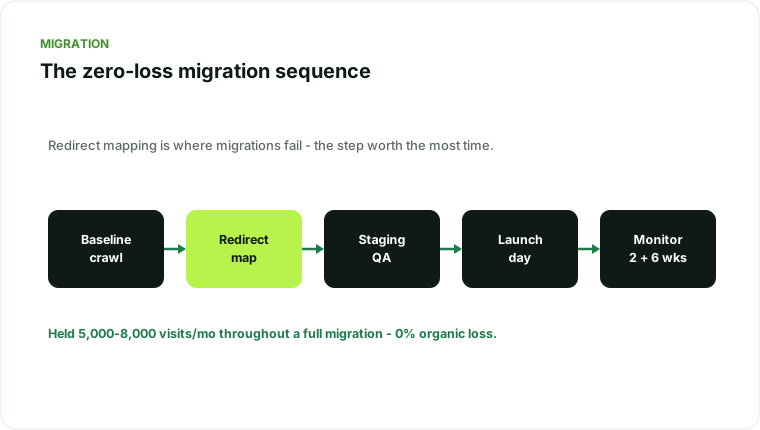
Redirect mapping
This is where most migrations actually go wrong, and it’s the step worth spending the most time on.
- Map every old URL to its new equivalent, 1:1 where possible. Not folder-level or wildcard redirects as a substitute for real mapping - those are a fallback for edge cases, not the primary strategy. A wildcard redirect that sends every old blog post to the new blog’s homepage will preserve a destination but not the actual ranking signals tied to that specific URL.
- Never redirect everything to the homepage. This is the single most common and most damaging migration mistake. It tells Google none of your old content has an equivalent, which is rarely true and destroys the specific relevance signals each URL had built.
- Use 301s, not 302s, for anything permanent. A 302 signals “temporary” and Google may not pass full ranking signals or may keep the old URL indexed alongside the new one.
- Avoid redirect chains. A → B → C should become A → C directly. Chains slow crawling, can lose signal at each hop, and are a common byproduct of migrations layered on top of previous migrations.
- Cross-check the redirect map against your backlink export. Every URL with meaningful external links needs to be explicitly accounted for - these are the URLs where a mapping mistake is most costly.
- Build the map as structured data (a spreadsheet or database table), not ad hoc rules. This is what makes the map machine-checkable before launch - you can programmatically confirm every old URL has a mapped destination, rather than trusting that the redirect rules “should” cover everything.
- Flag parameter and pagination URLs explicitly. These are the most commonly forgotten category in a redirect map - nobody manually lists
?page=2or?sort=pricevariants, but crawlers and Google both know they exist, and unmapped versions become soft 404s or orphaned indexed pages. - Assign a named owner for the redirect map, separate from whoever owns the platform migration itself. On larger migrations, redirect mapping is easy to treat as “the developer will handle it” - it needs an SEO-literate owner who understands which URLs actually carry ranking weight, not just which ones technically exist.
Staging QA
Before anything goes live, the redirect map and the new site need to be tested against each other, not just reviewed by eye.
- Crawl the staging environment the same way you crawled the live site - full site, all templates, all status codes.
- Test the redirect map programmatically. Request every old URL against the staging redirect rules (or a rules export) and confirm each resolves to the intended destination with a 301, not a 200, 404, or unexpected chain.
- Check canonical tags on the new site. They should point to the new URLs, not leftover references to the old domain or structure.
- Verify the new sitemap.xml reflects the new URL structure exclusively, with no old URLs included.
- Confirm robots.txt on staging is blocking indexation (staging environments accidentally left crawlable and indexed are a surprisingly common, avoidable problem) and that the production robots.txt is ready to go live open, not still carrying the staging block.
- Validate structured data on new templates against the old site’s schema - migrations frequently drop schema that took months to accumulate rich-result eligibility for.
- Spot-check Core Web Vitals on the new templates before launch, not after - see the technical SEO audit checklist for the full page-experience checklist if the new platform changes your rendering approach.
Launch-day checklist
- Deploy the redirect map first, confirmed live, before or simultaneously with DNS/platform cutover - not as a follow-up task for “sometime this week.”
- Submit the new sitemap in Search Console immediately after launch.
- Request indexing on your highest-priority pages directly, rather than waiting for organic recrawl.
- Verify the live redirect map with the same programmatic check used on staging - request a sample (or, ideally, all) of the old URLs against production and confirm correct behavior. Staging behavior and production behavior can differ due to caching layers or CDN rules.
- Check robots.txt is now open for production crawling - the inverse of the staging check above; a forgotten staging-style block on launch day silently deindexes an entire freshly launched site.
- Monitor server response codes in real time for the first few hours - a spike in 404s or 500s post-launch is the earliest signal something in the redirect map or server config is wrong.
The crawl-comparison method
This is the step that made the zero-loss result possible, and it’s worth understanding even if you don’t build custom tooling for it.
The idea is simple: a crawl of the site before migration and a crawl of the site after migration should be diffable against each other in a structured way, not eyeballed. I built a Python analyzer that took the pre-migration crawl and the post-migration crawl and automatically flagged:
- Any pre-migration URL that didn’t resolve to a mapped destination (a missed redirect)
- Any redirect resolving to an unexpected status code or an extra hop
- Any pre-migration page whose title, H1, or meta description didn’t carry over to its mapped destination (a signal the content itself got lost or altered in the move)
- Any drop in internal link count to a given destination URL compared to its pre-migration equivalent
- Any indexed URL count discrepancy between the sitemap and what Search Console reports as indexed, checked daily for the first two weeks
This turns “did the migration work” from a subjective judgment made a month later - once traffic has already moved - into a checklist you can run the day of launch and every day for the following two weeks. Problems get caught in hours, not in the next monthly report. That’s the entire difference between reversing a loss and never having one in the first place.
If you’re not building custom tooling, the same principle applies with off-the-shelf tools: crawl before, crawl after, and diff the two crawls systematically rather than spot-checking a handful of pages you remember to check.
Post-launch monitoring
The work isn’t done at launch - most migration damage that isn’t caught in the first 48 hours shows up over the following two to six weeks as Google recrawls and re-indexes the new URL structure.
- Daily for the first 2 weeks: indexed page count (GSC +
site:search), 404 rate, redirect map spot-checks, ranking checks on priority terms. - Weekly for the following month: full Search Console performance comparison against the pre-migration baseline, by page and by query - not just aggregate site traffic, which can mask a real problem in one section offset by growth in another.
- Re-run the full crawl-comparison at 2 weeks and again at 6 weeks post-launch, since some issues (orphaned pages, missed internal links) only become visible once Google has had time to recrawl and re-rank the new structure.
- Watch for the “temporary dip and recovery” pattern, which is normal even in a well-executed migration - a brief adjustment period while Google re-indexes is different from a sustained loss, and the difference is visible in how the two-week and six-week comparisons trend against each other.
- Keep the old redirect rules live for at least 6-12 months, longer if the domain change is significant. External links, bookmarks, and cached references to old URLs persist far longer than most teams expect, and removing redirects early re-triggers the exact loss the migration was designed to prevent.
- Re-verify backlinks are landing correctly a few weeks post-launch, not just at launch - some referring sites cache old URLs and take time to reflect any changes, and a redirect that worked at launch can be affected by later server or CDN changes.
What can still go wrong even with a checklist
A checklist reduces risk; it doesn’t eliminate the possibility of a partial loss, especially on complex migrations. The most common residual causes I see even on well-planned migrations: content that changed meaning during a “refresh” done at the same time as the platform move (conflating two projects into one makes it hard to isolate which change caused which effect), JavaScript rendering differences between the old and new platform that affect how content is actually seen by Googlebot, and internal linking that technically redirects correctly but no longer flows through the same architectural pattern that built topical relevance in the first place. This is why the crawl-comparison method checks content parity (titles, H1s, meta descriptions) in addition to redirect status - a 301 that lands on thinner or restructured content isn’t a clean pass.
If you’re wondering specifically how long recovery should take once a migration is live, that’s covered in detail in how long does an SEO migration take to recover - short version: technical fixes show within days to weeks with this method, because you’re preventing the loss rather than reversing it after the fact.
Downloadable SEO migration checklist
The pre/post crawl-comparison steps above are available as a structured SEO migration checklist you can adapt to your own migration - the same working structure used on the moving-company migration, covering baseline crawl, redirect mapping, staging QA, launch day, and the two-week/six-week monitoring cadence.
↓ Download the SEO Migration Checklist (PDF)
Free, no email required - baseline crawl, redirect mapping, staging QA, launch day, and the two- and six-week monitoring cadence, in one page.
When to get help
Migrations are unforgiving of a rushed timeline - “we’re launching Friday, can you just check the redirects Thursday night” is how zero-loss migrations become significant-loss migrations. If you’re planning a migration and want the pre-migration baseline and redirect map built and verified before launch rather than diagnosed after a drop, that’s exactly the kind of work my SEO migration help covers - and it pairs directly with the organic traffic drop diagnosis framework if a previous migration already happened without this process and something looks off.
Traffic sliding, or planning a risky migration?
I diagnose why organic traffic dropped and reverse it - core updates, migrations, cannibalization, technical decay.
Explore SEO recovery services